If you have clarity in your mind about your website’s intention, purpose, goal, etc, then it will be easier for you to build a website that looks professional and authentic. Let’s dig deeper below:
Table of Contents
Psychological Clarity to build a website:
Your definite thought or idea determines your action. If you have ambiguity in your mind, come to a concrete conclusion of what you are going to do to build a website. To do this, you can follow these steps:
#1 Be creative: Creativity is not a predetermined thing; it’s an open source for every creative being. And creativity comes from the investigation of existing ideas. For example, you might have a profession, skills, Unique abilities, services and ideas that exist, but creative representations, expressions and exhibitions are required. So, look at what you already have like branches of knowledge to share, expertise in the field to teach, products to sell, services to offer, etc.
#2 Identify Your Website Types: There are several types of websites that works with different features:
- e-Commerce website: This type of website used for selling products. Such as, clothing, accessories.
- Blog Or Article website: This type of website showcases a series of blog posts to share information, knowledge, tutorials, etc. Suitable for niche bloggers.
- Personal brand website: A website that represents a person’s unique value, expertise, services, consulting, etc to the audience. They’re ideal for multi-interested individuals.
- Etc.
#3 Draft Everything: After selecting your website type based on your intention, you need to go through several steps to start designing your website:
- Imitation: Imitation is one of the human instincts. We learn things by copying the master’s actions. Such as, numerous things we learn by imitating our families and neighbours’s actions in different circumstances. Similarly, to create a website for yourself, you need to study the other successful websites to get an idea of designing and approach. Take a piece of blank pages, or notebook, start exploring the websites of others because everyone has their own uniqueness, values, styles of expression, etc. More importantly, you can learn about the audience’s actions and reactions that will help you while building your website. And draw, or write whatever the thought comes to your mind in this exploration period. Furthermore, practice this exploration of websites for at least 2 to 3 weeks everyday.
- Back Yourself: backing yourself and going with your instinct, nature or ideal is the ultimate way to refresh your brain and set a goal or find your aim to get started. Sometimes, we confuse ourselves by comparing ourselves with others which is very childish, rather than being a learner for our own growth. Here learning from others doesn’t mean 100% agreement, self-evaluation is necessary to avoid brainwashing or false beliefs.
- Stop chasing perfection: Sometimes, searching perfection become enemy for us due to pressure it creates are immense that your brain loses focus from the main work and wander in unnecessary thoughts. So, stick to a process and habits to complete a task.
- Appreciate and Start: Appreciation is a great virtue we can develop to overcome thought contradictions and conflicts. Appreciate everything in the universe and start doing what you truly desire to do. So, allocate all the drafts of your website designs and approaches into a page, then begin your designing in website builder platforms.
Technical Clarity to build a website:
To build a website you don’t need to be a technical giant, you need to become accustomed with designing and managing a website. As a beginner, it is ideal to start with WordPress because WordPress is a popular content management system and it has diverse and vigorous functionalities of plugins and themes that makes things user-friendly. Though, there are many website builders who have their unique functionalities, such as Squarespace, Wix, Webflow, etc. So, Let’s start building website with WordPress step by step below:
- Step 1: Pick a name for your website: The best way to pick a name for your website is playing with different names in the domain provider’s dashboard.
- Search for a name that is short and simple that creatively demonstrates your business or website purpose. Such as,
- To find a name for your website, look at overlooked things. For example, your business is about clothing, and you see a shirt hanging in the stack of your desk. Now, brainstorm names that align with this hanging picture in your mind; such as www.hook.com, or lookyhooky.com, etc.
- If your domain name is not available, you can try to add an extra word or letter with your selected domain name.
- If you find a domain name and still have confusion in your mind, I will recommend picking it and starting making a website, you can see it will adapt to your brand itself later. Or you can change it later by transferring the domain to your new one.
- To register your intended domain name, choose a domain provider company and buy it by filling an address and payment form. And Price depends on what types of domain you want to buy such as the most common and popular one is .com which is priced for above $9 per year.
- Step 2: Choose your web hosting to make your website live and online: After picking the name for your website, you need a hosting service to see your website live on the internet. So, let’s do this below: First, the platform I selected is WordPress to build a website, and then Hostinger to host our website. See the setup process there.
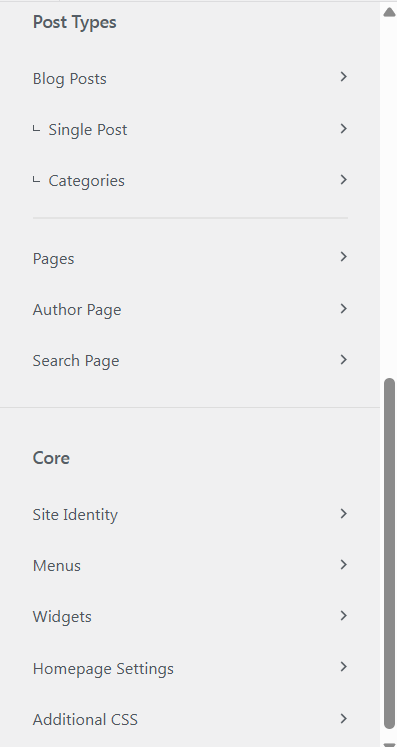
- Step 4: Design Your Website with WordPress: To design your website, you need to download a theme —free or premium. I would recommend starting with free themes like Astra, Blocksy, or Kadence. Such as, Install the Blocksy theme and then activate it. To customize your website, go to Appearance – Customize. Then, you’ll have the 3 customization options: General Options, Post Types, and Core.
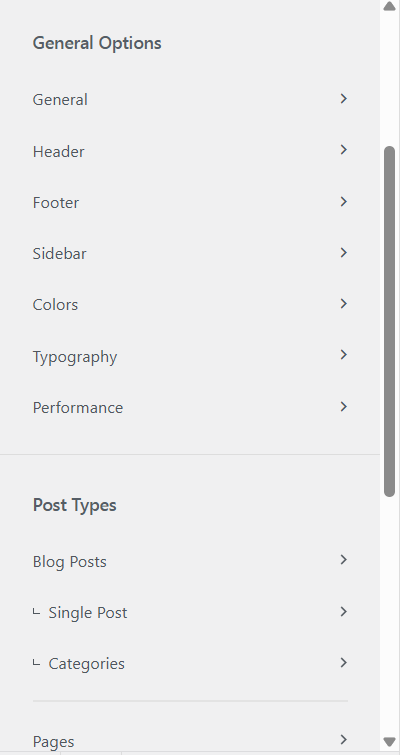
# 1 General options: general setting works with the fundamental aspects of your website.
- General: Layout settings, Buttons, Breadcrumbs, Form setting, social network linking, etc.
- Header: Header is the top part of your website, which contains the logo, navigation links, etc. The header area has three rows: Top row, Main row, and Bottom row. You can add any elements to these rows to design your website such as menu, button, social, etc.
- Footer: Footer is a bottom part of your website, consisting of three rows: top, middle and bottom. You can put any elements like widget, socials, menu, copyright, etc.
- Sidebar: Sidebar is a widget used for showcasing bio, categories, etc to your website’s left side along with your main contents. Here, you can choose the design and customize the sidebar.
- Colors: Colors section deals with basic color plates for your website. Such as, text color, link color, h1-h6 colors, background color of the website, etc.
- Typography: Here you can customize your website’s typographies in every aspect.
- Performance: here you will find an option to enable lazy load images to increase your website performance.
#2 Post Types: This section is fully dedicated to structuring your website’s posts and pages functionality and designing. Such as, how you want to structure your single post: adding post elements, styling, etc similar things applies to pages, author page and search page setting.
# 3 Core: Core section determines several fundamental aspects of your website. Such as,
- Site Identity: selecting your website title, tagline, and adding site icon that appears in the google ranking.
- Menus: You need to create a menu for your website such as home menu and footer menu or you can give a name to each whatever you want.
- Widgets: if you use any widget in your website pages or post, you can customize them in the widgets section.
- Homepage settings: Homepage setting means how your home page is going to look like. For example, you can either choose the latest posts option or a static page (static page is custom designed). Additionally, you can select any page as a home page.
- Additional CSS: Css is programming language that works with styling of a website. So, if you want to use if for customized designing, you can implement css code in this section.
Step 5: Create your pages and blog post: Creating a page is simple and easy, just go to the page section in the WordPress side admin area and tap the add page. But you need a complete picture of what you want to show up or structure your page. Such as, different pages have different design structures. I personally use the Gutenberg editor and the Elementor page builder to edit and build pages. Here are a few common pages: Home, About, Blog, Contact, Privacy policy, etc.
- Homepage: Generally homepage used for landing page means when your website visitor clicks to your website link, they directly land into this page and you can select any of the other pages as a landing page of your website. To attract and persuade your visitor, you need to introduce your website clearly section by section and help the visitor to take required action. Thus, before designing the homepage, look for another website to get the idea and draft what you’ve got in a paper. Don’t panic, start with simple and then upgrade later.
- About page: This page addresses the identity of your website, industry, company, or you. Particularly, through visual and written story-telling of who you are, what your company is about, why you are about to come here, what values you boast, promises you want to give, and so on.
- Blog page: Having a blog page always creates authenticity and credibility. Additionally, blogs give freedom to connect with readers by sharing knowledge, ideas, and expertise. It also exhibits your passion for something that you care so much about. More importantly, Blog can be the heart of your website because it brings traffic to your website, if it is properly SEO optimized.
- Contact page: if you serve a professional service that requires your contact, then you have to add a contact form to communicate with you through filling out basic information (name, email, phone number, etc).
- Privacy policy: Privacy policy page discusses the information and data collection rules and terms of your visitors to build trust and security.
Step 6: Create your first blog post: Creating a blog post is simple, login to your wordpress account and click the post section from the left side bar and add post. That’s it! Not yet. You have to add a title and need to write about it. So let’s do it: crafting quality content is so vital to grow and retain readers to your website. Let’s follow the process of producing a high quality content:
- Establish a Title for your blog: To get a title for your post, you can search and discover blog posts from various websites on your interested topic. Especially SEO optimized. Such as, Write down all the titles you’ve got, then search the Keyword on the Ahref, Semrush, to see the demand and competition for this keyword to make an informed decision.
- Make sure your expertise and experience: You have to be truthful and reliable to your expertise and experience to produce a quality content that will solve the reader’s problem. And the most ideal way to find a topic to write about it is through surveying your previous experiences on solving your own problem.
- Expand your vision: After setting a title, you should study it. Collect relevant resources on this selected topic like books, articles, and research papers to become familiar with this topic to write about it fluently. Furthermore, it is better to see one thing from many eyes than two eyes, because we sometimes miss seeing color in a picture that someone sees. So, view a thing through your eyes and through others as well for getting extended vision of a thing.
- Start writing no matter what: Don’t wait for perfection to get started because it ruins the excitement and creates doubt. And focus on what truly matters because it brings the desired result. So, start your writing and then you will see how everything is composed harmoniously.
- Finally, optimize your content for google search engines: to reach out to your audience, SEO is mandatory. SEO provides organic traffic from Google search and improves visibility of your blog post in the google ranking. So, here are a few SEO applications you can apply in any WordPress SEO tools like RankMath, Yoast SEO: Responsiveness of your website, adding optimized images and videos to your blog with intended keywords, internal and external linking, implementing table of content to your post, etc.
Step 7: Ensure your website security: Website security practices are crucial to avoid panic of getting hacked or removed contents from your website. There are two security methods: manually and through plugins. Here, I will show through plugins:
- Sucuri security plugin: First, install the Sucuri security plugin, activate it, then enter its dashboard and find hardening options. And apply hardening to these options accordingly: Verify WordPress Version, Remove WordPress Version, Block PHP Files in Uploads Directory, Block PHP Files in WP-CONTENT Directory, Block PHP Files in WP-INCLUDES Directory, Verify Default Admin Account, Disable Plugin and Theme Editor.
- Limit Login attempts Reloaded Plugin: This plugin will limit the unlimited login attempts to your WordPress website, especially from various brute-force attacks which is done through automatic software to match user name and password.
- MiniOrange’s Google Authenticator plugin: For robust security purposes, set up the MiniOrange 2 factor authentication. It adds an extra layer to your wordpress account beyond username and password means if anyone surpasses the login layer, they have to go through the authentication layer. It will give you an option called Configure Security Questions where you can select three questions and their answers. Furthermore, they offer various authentication methods like Google authentication, OTP over Email, OTP over SMS, etc.
- Other security plugins:
- Inactive Logout plugin.
- WP hide log out to hide your admin url.
- Jetpack plugin, WP Activity Log.
- Etc. Don’t worry I will craft a blog on WordPress Security soon.
Step 8: Add essential plugins:
- Google sitekit: Google sitekit is a plugin that allocates various google services at one dashboard. Such as, Google Analytics, Google Adsense, Google Search Console, Page Speed insight, etc.
- WooCommerce: If your website sells products, you can integrate the WooCommerce plugin beyond Shopify’s automatic store setup. The WooCommerce plugin handles everything from product design to payment gateway integration.
- Updraft plus: Updraft plus plugin used for website back up, restoring, and migration.
- Link Cheeker: Link Cheeker plugin helps to identify broken links and gives solutions to fix it.
- Etc.
Marketing Clarity to build a website:
Marketing is all about the approach you take such as educating people about your products, the value you bring, the honor you give, so on. For example,
- Education: people value education, and when you educate the audience about your services or products they begin to trust you and respect you.
- Value propositions: There are plenty of values in marketing like personal values. Such as, Promise, Honor, Truth, Transparency, Simplicity, etc.
- Anyway, from the website marketing perspective, there are several ways to market your services or website: Content Marketing, Affiliate Program, Guest Blogging, Email Marketing, Running Paid social media Ads, etc.
Several social platforms are great for marketing :
- Pinterest is highly recommended for visual post to attract visitor to your blog or website.
- Instagram is great for e-commerce marketing.
- TikTok is a genuine traffic source for E-commerce or WooCommerce due to short-form video.